What's new
A monthly digest of the biggest improvements to Convo.
The month's biggest wins, written up in plain English. For everything we
shipped, week by week, see the changelog.
October 2026
Staged photos, shareable films and tours that live on your own site
October was about getting a listing in front of more people. You can now virtually stage or declutter any tour photo from the Photos tab, and visitors on a listing tour can reimagine a room in a new style from a full-screen photo. Staged and AI-animated images are always labelled, with the original one tap away.
Sharing got simpler too. A new Share button sends a tour link or its film to social networks, email or text, films download as landscape or portrait video, and exported films can carry word-by-word captions. Tour, exhibition and venue pages can now be embedded in your own website.
For museums and galleries, tours can open as an interactive 3D gallery, with works hung in stop order. And for everyone, narration voices are easier to choose, scripts accept pronunciation hints, the voice guide greets visitors as soon as they connect, and voice conversations now appear in analytics.
September 2026
Listing films that feel made for watching
September's focus was the listing film. Listing tours have a new Film tab where you can review and refine the film's script, set to music, and the narration now uses a style written for watching rather than walking. Tours open with the film and then move room by room, with photos that change in step with the narration and can play as short animated clips.
Listing pages show the property's key details beside the film, and tours with depth and parallax effects play as smooth video on the venue page.
Unlisted tours also get a readable private link you can share or print as a QR code, and shared tour links now show a rich preview card with the tour name and cover image.
August 2026
Contacts, an inbox for enquiries and a tour from a link
August made Convo work harder for teams who hear from visitors and buyers. Each tour can now carry a named contact, such as a curator or listing agent, and visitor enquiries arrive in a new Inbox. Real-estate teams see vocabulary that fits their work, such as Listings and Rooms, and can generate a tour straight from a listing link.
Publishing became instant, a tour can offer as many visitor languages as you like, and narration starts almost as soon as a visitor presses play. Tours and stops have a new Images tab, floor plans can belong to a single tour, and reference files can be added by pasting a public link.
For visitors, the player gained a transcript that follows along, automatic advance to the next stop, a search-first home page and a single dock for ask, voice and scan. Tour pages can also open with a narrated film in the hero.
July 2026
Audience versions, a signage kit and help on every page
July gave teams more ways to shape and promote a tour. You can create audience versions of a tour, such as For Families or In Depth, and visitors choose the one that suits them before they start. A new Promotion tab gives every tour a print-ready signage kit, and every stop has its own preview and QR code.
Getting started is easier, with a checklist that walks new teams through their first tour and Ask Convo, a help assistant on every page of the portal. You can set the language your scripts are written in, ask the AI to suggest stops from your reference files, and bring outdated audio and translations up to date in one click.
Organisations with several venues can manage each one separately, visitor pages carry your own logo and brand colour, and the visitor app now speaks the visitor's language across all 40 supported languages.
June 2026
Expert narrators, 40 languages, and visitors who can scan any object
Narration has always been at the heart of a great audio tour, and this month Convo made it easier to bring the right voices in. A contributor link lets an artist, curator or expert record narration for a stop without a Convo account, and you can upload a real human recording as a stop's narration, with translations following from it.
Visitors can now scan or photograph an object to jump straight to its audio, and collection items and exhibitions have their own pages where visitors can listen and ask questions by text or voice.
The supported catalogue grew to 40 languages, including right-to-left languages such as Arabic and Hebrew, and tour and stop names are translated when you publish. A new Exhibitions page lets you organise exhibitions, items and tours, and self-serve plans arrived with a free trial or a cardless pilot.
May 2026
A smarter voice guide and Q&A you can learn from
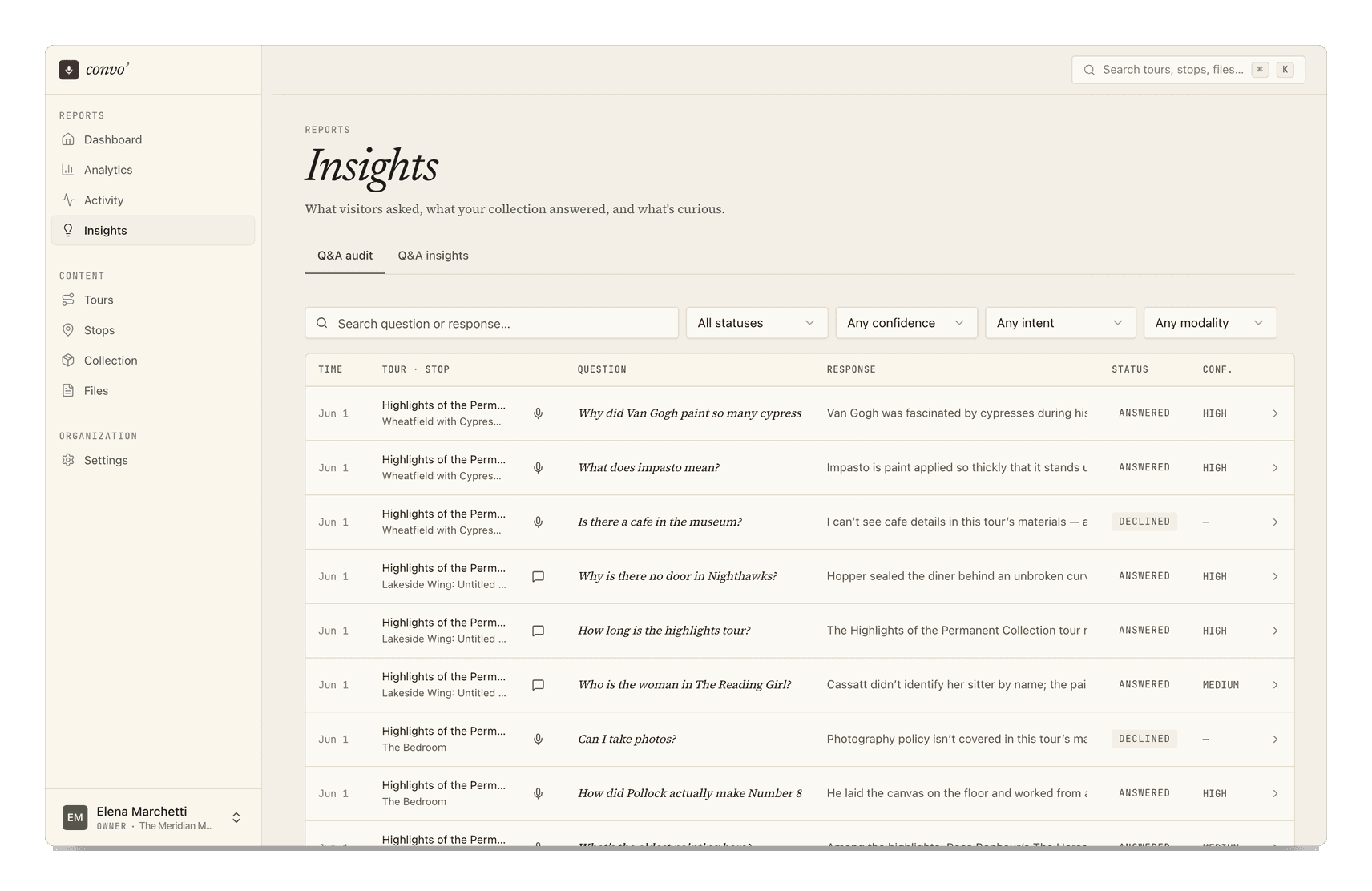
May was about understanding your visitors and making every conversation better. The headline is Insights, a new view that surfaces the themes visitors keep asking about, the gaps where your content comes up short, and a plain-language takeaway you can act on. Explore Insights.
The live voice guide took a big step forward too. It grounds its answers in your own tour materials, sounds more natural, picks up where a visitor left off, and lets visitors point their camera at an object and ask about it. See what visitors experience.
Authoring got faster with a slide-in stop editor on the tour page, where you can review a script, compare unsaved changes side by side and chat with the AI assistant in place. Working with stops. The whole portal also wears a refreshed new look.
April 2026
A smoother path from tour link to final stop
This month is about the visitor's first few minutes. Visitors can now browse and take tours without signing in, and those who land on a tour or organisation page can continue straight in their web browser. There is nothing to set up on your side. A link or QR code now takes people from curiosity to the first stop with very little in the way. You can read more about what visitors see in the visitor experience guide.
The player has a new look, called In Conversation, and more to offer once a tour is underway. Visitors can follow along with an on-screen transcript, pick up where they left off thanks to saved progress, and control playback from the lock screen. They can also share a tour with friends. They can switch the tour language from the player and scrub to any point in the narration, which makes it easier to replay a favourite passage or skip ahead.
Translations are also better. Every tour language now has higher-quality translations, so visitors listening in their own language get narration that reads more naturally. See the languages guide for what's available.
For your team, the portal has a new look, with refreshed tables, filters and page layouts that make it easier to find your way around.